
2.1. Robot Main State
The robot main state describes the current operating state of the voraus Robot Control. It determines which commands are accepted, whether the regulators of the axes are switched on, and whether the robot can move. The robot main state is published via OPC UA (see OPC UA).
A schematic overview of all states and transitions is shown in Fig. 2. The states are described in section States, the transitions in section Transitions.
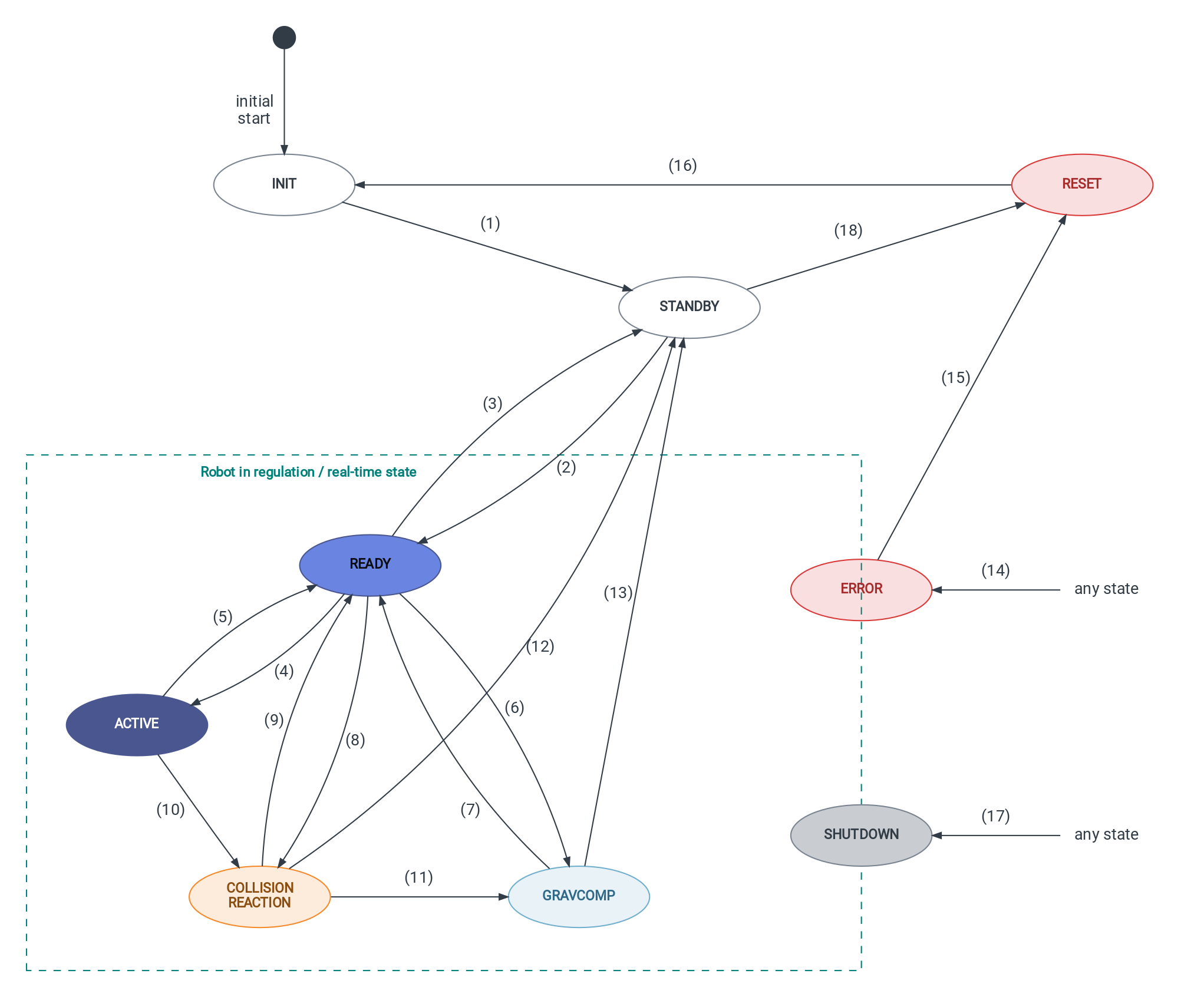
Note
The states GRAVCOMP and COLLISIONREACTION are robot-specific and only available on robots that
support hand guiding or collision reaction, respectively. When an external robot driver is used, that is, if
VRC_USE_ROBOT_DRIVER is set to True (see Robot Control Settings), both states are not
supported.
2.1.1. States
The column OPC UA Value, in Table 1, contains the numeric value of the OPC UA variable
RobotMainState (see OPC UA).
The column Real-Time State indicates whether the voraus Robot Control executes the state with real-time performance. File operations that could violate the real-time cycle, such as writing data files, are only performed in non-real-time states (see Writing JSON Files).
State |
OPC UA Value |
Description |
Real-Time State |
Regulators On |
|---|---|---|---|---|
|
|
Initialization of the robot and establishment of communication with the drives. |
No |
No |
|
|
The robot is initialized and ready for the regulators to be switched on. The robot cannot move. |
No |
No |
|
|
The regulators are switched on and the robot holds its position. Motion commands, jogging commands, and cyclic position commands are accepted. |
Yes |
Yes |
|
|
Reserved, not in use |
– |
– |
|
|
An error has occurred. The robot decelerates to a standstill and the regulators are switched off. The state is kept until a reset or a shutdown is performed (see Behavior in the ERROR State). |
No |
Until standstill |
|
|
The robot executes motion commands. The setpoints of all axes are calculated by the interpolator in each cycle. |
Yes |
Yes |
|
|
Active errors are reset. The communication with the drives is re-established if it was lost (not with an external robot driver). |
No |
No |
|
|
Gravity compensation: the robot compensates its own weight and can be moved manually (hand guiding). |
Yes |
Yes |
|
|
The robot is brought to a standstill and the regulators are switched off. Afterwards, the voraus Robot Control process is terminated. |
No |
Until standstill |
|
|
A collision has been detected and the configured collision reaction is executed (see
|
Yes |
Yes |
2.1.2. Transitions
The numbers in Table 2 correspond to the numbers in Fig. 2. Transitions that are not listed are not triggered by the voraus Robot Control. Requesting a state that is already active has no effect.
Triggers caused by the safety controller only apply to robots whose safety controller is connected directly to the voraus Robot Control. They do not apply when an external robot driver is used.
No. |
Transition |
Trigger |
|---|---|---|
|
Automatic, as soon as the communication with the drives is established, the robot-specific initialization is completed, and all pending file write operations are finished. |
|
|
SetRegulatorsOn is called. The transition takes place automatically as soon as all axes are in
regulation.Robots that require indexing return to
READY automatically after the indexing is completed. |
|
|
SetRegulatorsOff is called.An axis leaves regulation unexpectedly. In this case, a Quick Stop is triggered (not with an
external robot driver).
Robot-specific procedures: the indexing switches off the regulators temporarily, the brake torque test
switches them off after its completion.
|
|
|
The execution of a motion command, a jogging command, or a cyclic position command starts (see Command Execution and Cyclic Position Commands). |
|
|
The last setpoint of all queued commands has been calculated, including after a completed stop. At this
point, the measured axis positions can still lag behind the commanded ones.
The safety controller signals a monitored standstill or prohibits motion. The robot is decelerated and all
queued commands are discarded.
|
|
|
|
|
|
|
|
|
A collision is detected while no error is active and the safety controller does not request a Safe Stop 1
(SS1) or Safe Stop 2 (SS2). The parameter |
|
|
The robot has been moved beyond the radius
CollisionReactionMovementRadius (see
System Parameter). The robot switches back to position control.The safety controller requests an SS1. The robot switches to
READY and subsequently to
ERROR. |
|
|
Same as (8). |
|
|
Same as (6). |
|
|
|
|
|
Same as (12). |
|
Any state → |
An error occurs. During |
|
|
|
|
|
All errors have been reset successfully and the communication with the drives is active. On robots with a
safety controller, the safety controller must also be ready. If the reset does not complete within a timeout,
the robot returns to |
|
Any state → |
SystemShutdown is called. In INIT, the command is executed after INIT is left.The process receives
SIGTERM or SIGINT. In this case, a Quick Stop is triggered
(not with an external robot driver).The safety controller requests a shutdown.
|
|
|
|
On real systems, after the start of the voraus Robot Control, the robot passes through INIT into
STANDBY. The regulators are not switched on automatically.
2.1.3. Behavior in the ERROR State
When the robot enters ERROR, the following reaction is executed:
The robot is decelerated with the stop method configured for the stop source
errorStop. If this stop method cannot be executed, e.g., during position streaming, a fallback applies (see Robot Stops).All queued and prepared motion commands are discarded.
After standstill is reached, the regulators are switched off.
If the robot does not reach standstill within the expected braking time, or the regulators are not switched off after standstill, a Quick Stop is triggered.
The robot remains in ERROR until it is reset or shut down (see transitions (15) and (17) in
Table 2). A reset is only executed if the robot is at a standstill and the
regulators are switched off. Otherwise, the reset is rejected with an error and the robot remains in
ERROR. After a successful reset, the robot passes through RESET and
INIT into STANDBY (see transitions (15), (16), and (1) in Table 2).
2.1.4. OPC UA
Under the node Robot (NodeId: 100000) the following information is provided:
NodeId |
Name |
Description |
|---|---|---|
100007 |
RobotMainState |
Current robot main state as |
The commands that change the robot main state are located at Robot/Commands/Control (NodeId: 100240), except
for SystemReset, which is located at Error (NodeId: 100). None of these commands has output arguments.
Table 4 describes their behavior if VRC_USE_ROBOT_DRIVER is set to
False. If an external robot driver is used, see the note at the end of this section.
The input argument IndexingRequired of SetRegulatorsOn confirms whether the robot has to be indexed
after the regulators are switched on. Set it to true only if indexing is currently required. If the value does
not match the indexing status of the robot, an error is raised.
The commands are executed asynchronously: the OPC UA method call returns Good as soon as the command has been
queued. The result of the command is indicated by the change of RobotMainState. An ignored command does not
change RobotMainState. An error raised by a command leads to ERROR, see Behavior in the ERROR State.
Note
When an external robot driver is used, SetGravCompOn, SetGravCompOff,
SetSystemToVirtualMode, and SetSystemToRealMode are not supported and raise an error.
SetRegulatorsOff is additionally accepted in ERROR and raises an error in all other states not
listed above. The input argument IndexingRequired is ignored.