
3.4. Overview of the Configurable Robot Stops
voraus Robot Control provides a configurable stop system that controls how the robot decelerates to a standstill. The stop system is composed of two dimensions: the stop source, which defines what triggers the stop, and the stop method, which defines how the robot decelerates. Each stop source can be configured with a specific stop method and, for time-based stops, a configurable stop duration. The exception to this is the quick stop, which is a non-configurable emergency stop, see Quick Stop.
3.4.1. Stop Sources
A stop source defines the origin of a stop request. The following stop sources are available:
Note
The userStop is always executed on the planned path. Assigning a stop method other than
PATHSTOPTIMEBASED to the userStop is not allowed and will be rejected.
Post-Stop Behavior
After a stop has been completed, the system behavior depends on the stop source:
3.4.2. Stop Methods
A stop method defines the deceleration behavior of the robot when a stop is triggered. The following stop methods are
available: AXESSTOPRAPID, AXESSTOPTIMEBASED, and PATHSTOPTIMEBASED. In addition, a
non-configurable QUICKSTOP exists as an emergency fallback.
The following priority rules apply to the configurable stop methods. The non-configurable Quick Stop has the highest overall priority and is executed regardless of the configured stops.
When a configurable stop is already active and a new stop is requested, the following rules apply:
AXESSTOPRAPIDhas the highest priority and cannot be overwritten by any other stop method.AXESSTOPTIMEBASEDcan overwritePATHSTOPTIMEBASED, but notAXESSTOPRAPID.PATHSTOPTIMEBASEDhas the lowest priority and can only be started if no other stop is currently active.
Quick Stop
The quick stop is a non-configurable emergency stop that is executed directly on the axis level. It has the highest priority of all stop methods and is used as a last resort when a safe braking ramp cannot be calculated or critical system errors are detected.
The quick stop is triggered automatically by the system when:
Robot is in regulation, but new commanded values could not be calculated or calculation failed.
An update of measured axis data fails, making a safe braking ramp unreliable.
The robot is in an active state but individual axes are not in regulation.
The robot did not reach standstill within the expected time during another stop.
A hard shutdown occurs (e.g.,
SIGTERM,SIGINT).Fieldbus communication is lost.
Robot is in error state and has reached standstill, but regulators have not turned off.
Robot is in error state but does not come to a stop.
Robot is in gravity compensation mode, but not all axes are in regulation (robot-specific).
Robot is in collision reaction mode, but not all axes are in regulation (robot-specific).
An error occurred during a brake torque test (robot-specific).
When a quick stop is triggered, a quick stop signal is sent to all axes. The axes are expected to stop independently and turn off their regulators. This stop is not on the planned path and not configurable by the user. In most cases, this behavior applies; however, the actual implementation may vary from robot to robot.
Warning
The quick stop should only be used in emergency situations. Damage to hardware may occur. It is not intended for normal operation and cannot be assigned to a stop source.
Axes Stop Rapid
Each axis decelerates individually at the maximum configured acceleration to reach a standstill as quickly as possible. The axes reach standstill asynchronously, each axis stop duration depends on the initial velocity and its acceleration limits. This stop is not on the planned path.
This is the fastest possible stop, which complies with the system limits, and is used as the default for
errorStop and ss1. It also serves as the automatic fallback if a time-based or path-based stop fails
(e.g., due to an interpolation error or exceeded stop duration).
Warning
The braking ramps for AXESSTOPRAPID are calculated in real time and are not checked against workspace limits,
axis position limits, or collision boundaries in advance. The robot may move beyond its intended trajectory before
reaching standstill.
The AXESSTOPRAPID is triggered in the following situations:
It is configured as the stop method for the active stop source.
An on-path stop is not possible (e.g., during position streaming or handguiding).
An error occurred in the calculation of another stop method.
Plausibility checks failed.
The robot has no motion clearance but is still moving.
No frames are left in position streaming.
The robot is moving while the motion safety controller is in monitored standstill or motion prohibited state (robot-specific).
The configured
AXESSTOPTIMEBASEDstop duration is invalid (shorter than the transition time).The robot did not reach standstill within the expected time during another stop. In This case the smooth transition into the rapid stop will be skipped!
To avoid unsteady accelerations and torques, the system applies a smoothed transition at the beginning and at the end
of the braking ramp. Over the first 0.1 s, the deceleration is gradually increased to its full value; over the last
0.1 s, the deceleration is gradually reduced back to zero, a schematic representation is shown in
Fig. 10. The transition time for axes-based stops; Axes Stop Rapid and
AXESSTOPTIMEBASED, is configurable via the transitionTimeAxesStop parameter in the
System Parameter. These transition phases ensure that the robot cannot switch into or out of the
braking ramp too abruptly, resulting in smooth acceleration and velocity transitions with steady torques. See section
Influence of the Transition on Stop Duration for more details on the influence of the smooth transition on the stop duration.
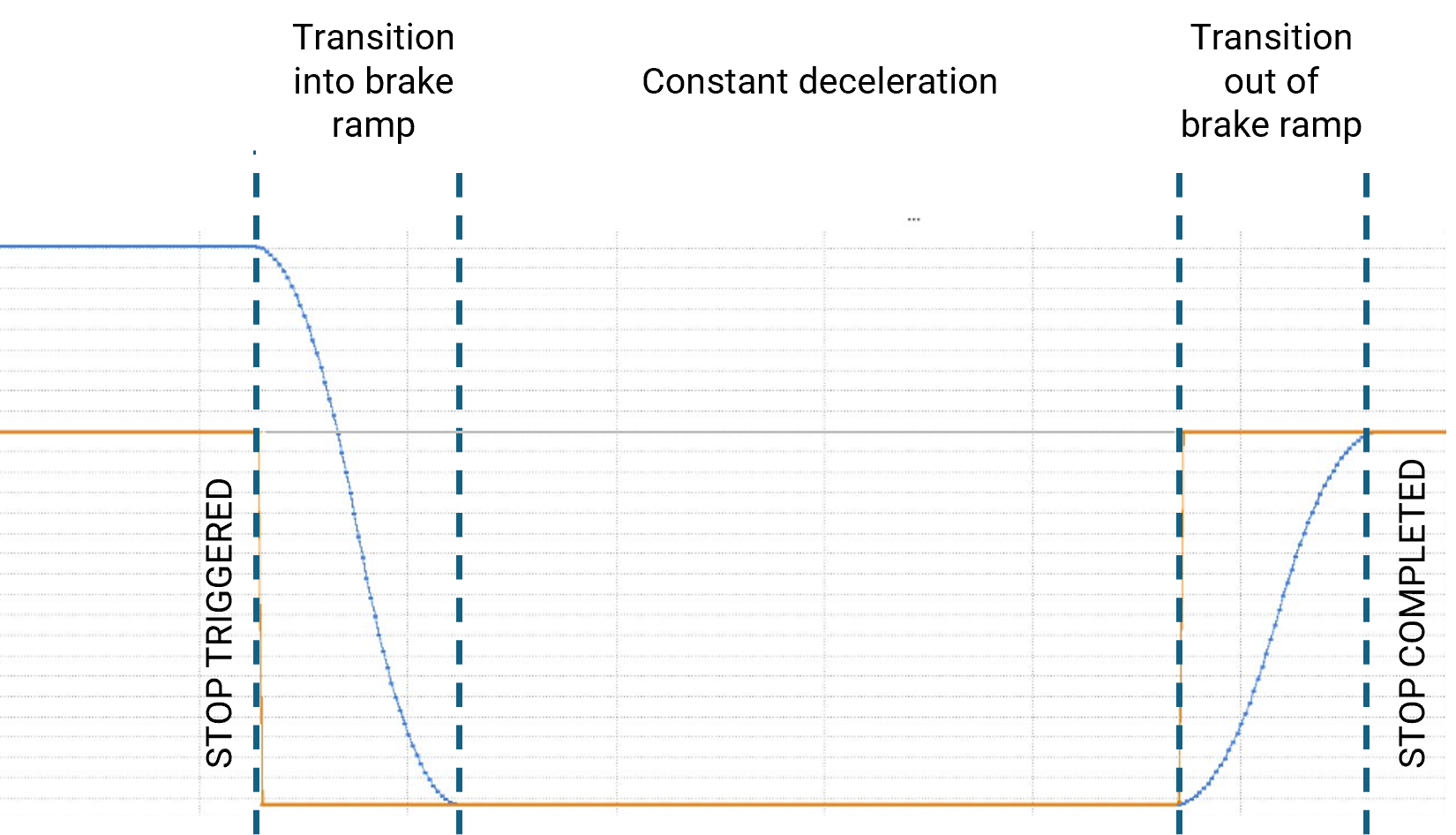
Fig. 10 Schematic representation of the transition phases during a stop
Note
During AXESSTOPRAPID the interpolator filter time and, therefore, the jerk value configured through
the values of IPOfilter_cycles_1 and IPOfilter_cycles_2 (see: System Parameter)
are ignored and replaced by fixed values.
Influence of the Transition on Stop Duration
Due to the smoothed transition at the beginning of the braking ramp, the effective stop duration of a rapid stop is always greater than or equal to the theoretical braking time plus the transition time.
Example: An axis is moving at \(90\,[\mathrm{°/s}]\) with a maximum acceleration of \(180\,[\mathrm{°/s^2}]\).
Theoretical braking time without transition: \(0.5\,[\mathrm{s}]\)
Braking time with transition: \(\geq 0.5\,[\mathrm{s}] + 0.1\,[\mathrm{s}]\) (depending on the acceleration at the time the stop is triggered)
If the axis is not accelerating or is already decelerating toward standstill at the time the stop is triggered, the stop duration increases by exactly the transition time:
Braking time with transition: \(0.5\,[\mathrm{s}] + 0.1\,[\mathrm{s}] = 0.6\,[\mathrm{s}]\)
If the axis is still accelerating at the time the stop is triggered, the transition time is slightly longer because the current acceleration is first gradually reduced to zero, which adds additional velocity to the system:
Braking time with transition: \(> 0.5\,[\mathrm{s}] + 0.1\,[\mathrm{s}]\)
Example of an Axes Stop Rapid
The Fig. 11 illustrates that the axes reach standstill with a time delay between them. Each axis decelerates at its individual maximum acceleration. The transition to zero velocity is smooth, without discontinuities or abrupt changes in the motion profile. The schematic representation of the transition phases shown in Fig. 10 can also be recognized in the acceleration profile.
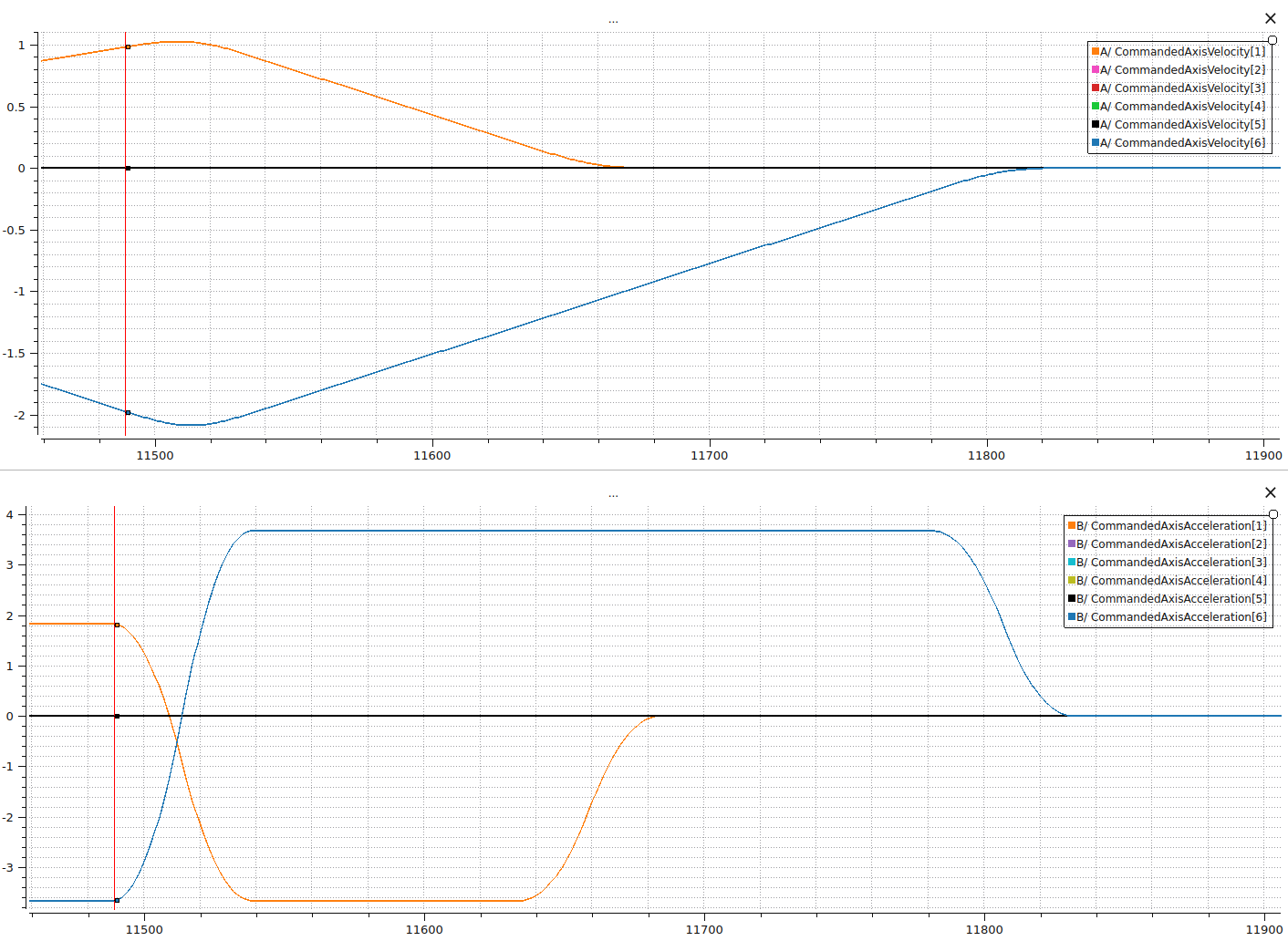
Fig. 11 Example of an AXESSTOPRAPID stop; velocity and acceleration over the voraus Robot Control cycle are
shown, with the start of the stop indicated.
Axes Stop Time-Based
All axes decelerate simultaneously so that they come to a standstill within a configurable duration. This stop is not on the planned path. Depending on the configured stop time, acceleration limits may be violated.
Warning
The braking ramps for AXESSTOPTIMEBASED are calculated in real time and are not checked against
workspace limits, axis position limits, or collision boundaries in advance. With longer stop durations, the robot
may move significantly beyond its intended trajectory before reaching standstill. It is the user’s responsibility to
ensure that the configured stop duration is appropriate for the current operating conditions.
Warning
If the configured stop duration is too short, axis acceleration limits may be exceeded during the braking ramp. This can lead to high torques and mechanical stress on the robot.
Similar to Axes Stop Rapid, the system applies a smoothed transition at the beginning and at the end of the braking ramp to avoid unsteady accelerations and torques. However, unlike the rapid stop, the transition phases do not extend the stop duration. Instead, the required acceleration is increased to ensure that the robot still reaches standstill within the configured duration.
The transition time for axes-based stops; Axes Stop Rapid and AXESSTOPTIMEBASED, is configurable via the
transitionTimeAxesStop parameter in the System Parameter.
Example of an Axes Stop Time-Based
The AXESSTOPTIMEBASED is exemplary shown in Fig. 12. All axes decelerate
simultaneously and reach standstill at the same time. The transition to zero velocity is smooth, without discontinuities
or abrupt changes in the motion profile. The acceleration profile shows that the required acceleration is increased at
the beginning of the stop to compensate for the transition phase, ensuring that the robot reaches standstill within the
configured duration.
The schematic representation of the transition phases shown in Fig. 10 can also be recognized in
the acceleration profile.
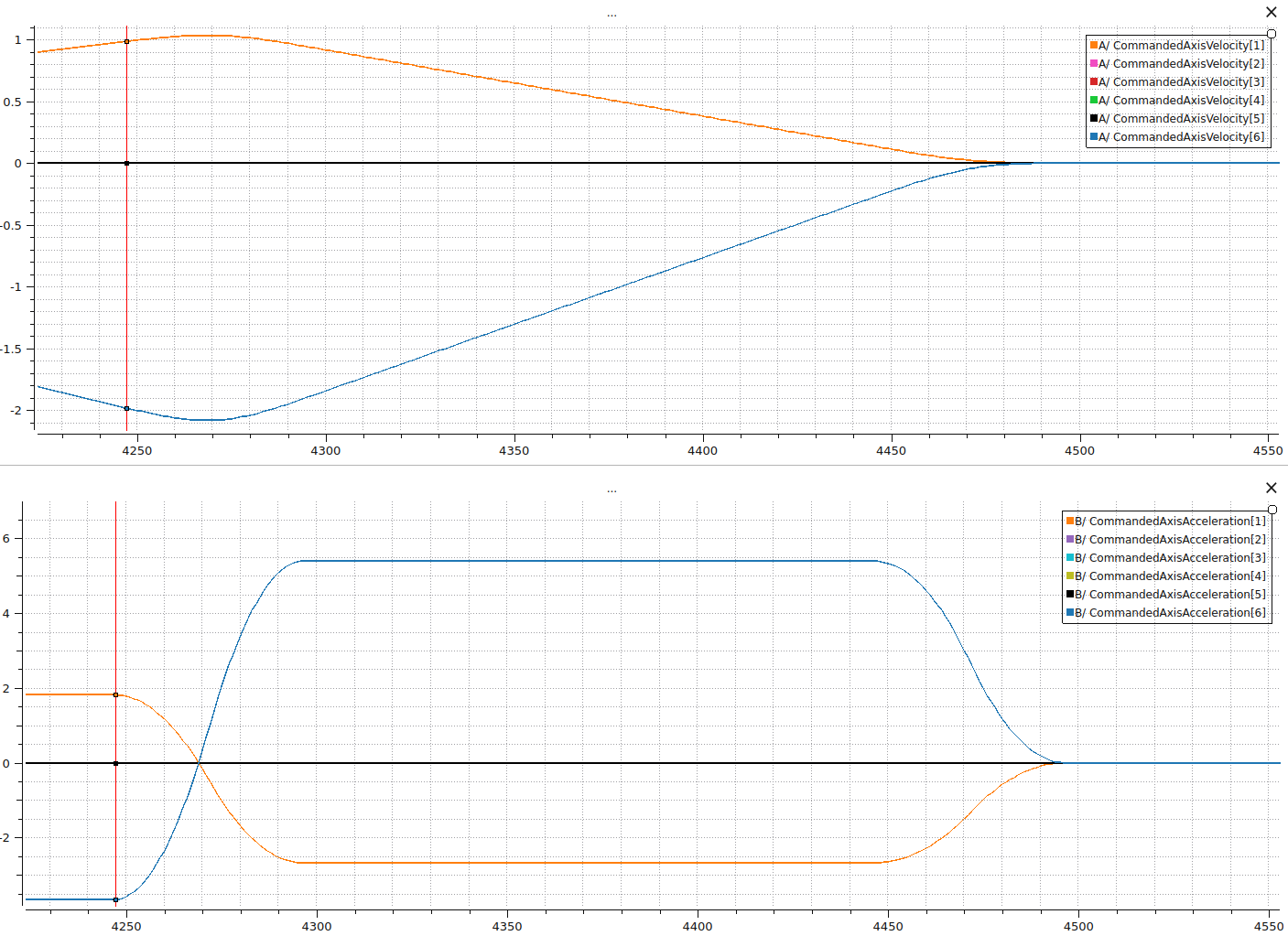
Fig. 12 Example of an AXESSTOPTIMEBASED stop; velocity and acceleration over the voraus Robot Control cycle are
shown, with the start of the stop indicated.
Path Stop Time-Based
The robot decelerates on the planned path within a configurable duration by reducing an internal time override from
1.0 (100 %, full speed) to 0.0 (0 %, standstill). This ensures a smooth, predictable deceleration along
the trajectory. Depending on the configured stop time, acceleration limits may be violated.
Warning
If the configured stop duration is too short, axis acceleration limits may be exceeded during the braking ramp. This can lead to high torques and mechanical stress on the robot.
This is the default method for userStop, as it provides the most controlled behavior during normal operation.
Note
A PATHSTOPTIMEBASED stop can only be started if no other stop method is currently active.
Note
On-path stops require a predefined trajectory on which the deceleration can be performed. In situations where no
such trajectory exists (e.g., position streaming or handguiding), the system automatically falls back to
AXESSTOPRAPID. If errors occur in the trajectory calculation during an on-path stop, a rapid stop is
performed as a valid movement profile is not guaranteed.
3.4.3. Stop Duration
For the time-based stop methods (AXESSTOPTIMEBASED and PATHSTOPTIMEBASED), the duration of the
deceleration ramp can be configured. The stop duration defines how long the robot takes to decelerate from its current
velocity to standstill.
Parameter |
Value |
|---|---|
Minimum duration |
\(0.005\,[\mathrm{s}]\) |
Maximum duration |
\(10.0\,[\mathrm{s}]\) |
Default duration |
\(0.5\,[\mathrm{s}]\) |
Note
The stop duration is only relevant for AXESSTOPTIMEBASED and PATHSTOPTIMEBASED. For
AXESSTOPRAPID, the deceleration is determined by the maximum configured axis acceleration.
Note
The configured stop duration might be decreased by a few cycles if the stop was triggered at a negligible velocity.
3.4.4. Configuration
Robot stops are configured in the robotData.json file under the "robotStops" key. Each stop source has
a stopMethod and a timeBasedStopDuration.
 1{
 2    "robotStops": {
 3        "errorStop": {
 4            "stopMethod": "AXESSTOPRAPID",
 5            "timeBasedStopDuration": 0.5
 6        },
 7        "userStop": {
 8            "stopMethod": "PATHSTOPTIMEBASED",
 9            "timeBasedStopDuration": 0.5
10        },
11        "ss1": {
12            "stopMethod": "AXESSTOPRAPID",
13            "timeBasedStopDuration": 0.5
14        }
15    }
16}
The following table summarizes which stop methods and duration configurations are available for each stop source:
For a detailed description of all configuration parameters, see the Robot Data file documentation.
3.4.5. OPC UA
The stop method and duration can be changed at runtime using the following OPC UA commands under
Robot/Commands/RobotStops/:
The StopSource and StopMethod parameters use the following integer values:
Stop Source |
Value |
|---|---|
Error Stop |
1 |
User Stop |
2 |
SS1 |
3 |
Stop Method |
Value |
|---|---|
|
1 |
|
2 |
|
3 |
Note
Changes made via OPC UA are not persistent. After the next restart, the values from the configuration files are restored.