
4.1. Vision Based Pick and Place with a Conveyor Belt on KUKA
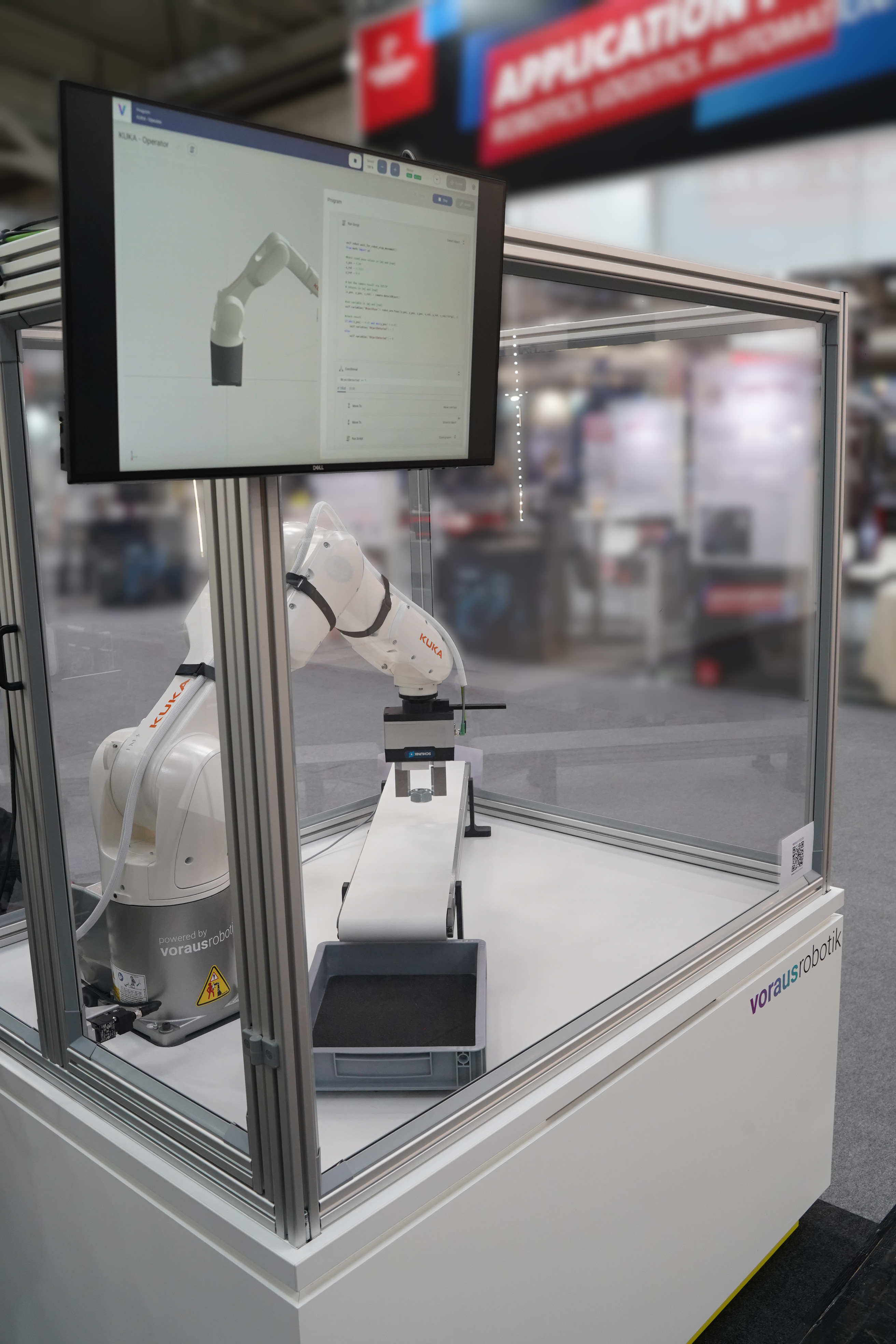
This tutorial will demonstrate how to create a vision based pick and place application with the voraus.operator like Fig. 218. The application uses a Sensopart V20-OB-A2-W12 camera for the vision based pose estimation that is mounted above the trace. A SCHUNK EGK 50 gripper and a Vetter conveyor belt FR-40-200-1000-10 controlled by a Beckhoff EL4004 4-channel analog output terminal are both connected via EtherCAT. The application is implemented on a KUKA robot.
4.1.1. Getting Started
Requirements
voraus products:
voraus.core configuration for KUKA robots
voraus.ipc (optional)
The voraus components and their purpose in this application is shown below:
        graph LR
    subgraph voraus.ipc
        direction TB
        ve["voraus EtherCAT"]
        subgraph vc["voraus.core with KUKA robot"]
            vo["voraus.operator"]
        end
    end

    subgraph EtherCAT Fieldbus
        direction LR
        ao["Analog Out"]
        ao --> gripper["Gripper"]
    end

    cam["Camera"]

    vc --:term:`TCP` trigger--> cam
    cam --position--> vc
    ve --process data--> ao
    vc --control--> kuka["KUKA Robot"]
    ao --voltage--> conv["Conveyor Belt"]
    User --program--> vo
Setup:
Prepare the camera following the Tutorial: How to integrate a SensoPart camera with the voraus.operator.
Connect the EtherCAT devices with the following topology:
voraus.ipc
├── Beckhoff EK1100 bus coupler
│   ├── Beckhoff EL1008 digital inputs (optional)
│   ├── Beckhoff EL2008 digital outputs (optional)
│   └── Beckhoff EL4004 analog outputs
└── SCHUNK EGK 50
Connect the PIN for the speed specification of the conveyor belt to analog output 1 of the EL4004 terminal.
Get the software package including the ESI file from the download section from the SCHUNK Product page. Extract and copy the ESI file to your TwinCAT installation path (default:
C:\TwinCAT\3.1\Config\Io\EtherCAT).
4.1.2. Implementation Steps
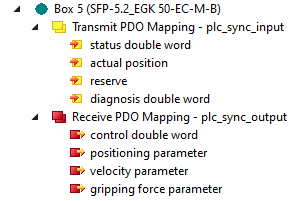
Follow the steps from voraus EtherCAT: Digital IO Example to create an ENI File using TwinCAT and setup the voraus EtherCAT. During these steps autogenerated python code will be created from the device descriptions. For the used SCHUNK gripper the device description looks like shown in Fig. 219.
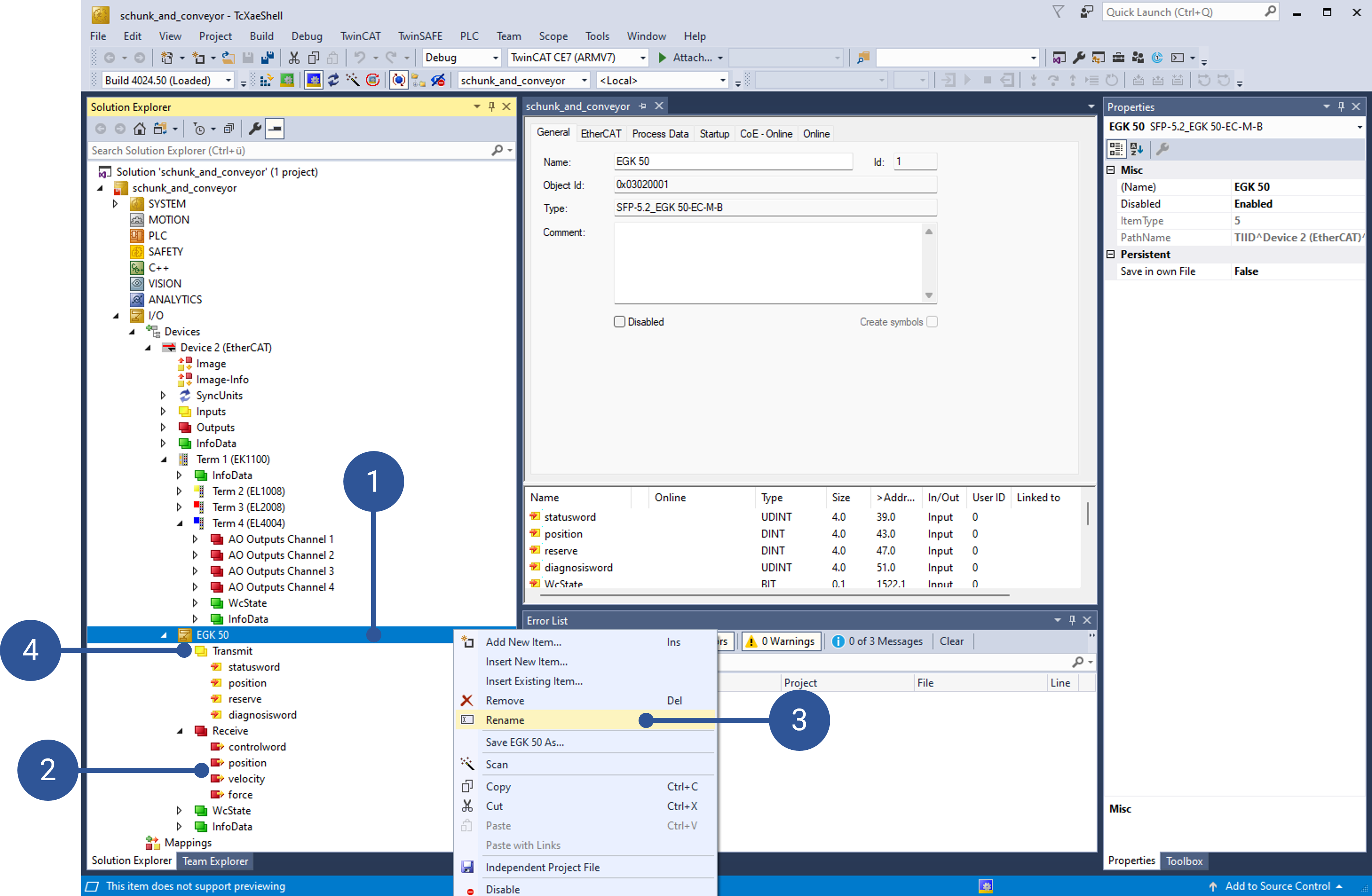
To increase the readability in the resulting code you can edit the naming. Thus, you can right-click on the Device Name or a process data obejct (PDO) name (Fig. 220/➊ + ➋) and then select “Rename” (Fig. 220/➌). To rename the PDO groups (Fig. 220/➍) you need to perform two consecutive single clicks.
The resulting autogenerated code looks like this:
Show Python code
 1"""API for Schunk EGK 50 Gripper and Conveyor."""
 2
 3    from voraus_ecat import EtherCAT, ProcessData, pdo
 4    import time
 5    from enum import IntEnum
 6
 7
 8    class Inputs(ProcessData):
 9        """Defines process inputs."""
10
11        def __init__(self) -> None:
12            """Initializes process inputs."""
13            super().__init__()
14
15            self.egk_50_transmit_statusword = pdo.Unsigned32("1:EGK 50.Transmit.statusword")
16            self.egk_50_transmit_position = pdo.Integer32("1:EGK 50.Transmit.position")
17            self.egk_50_transmit_reserve = pdo.Integer32("1:EGK 50.Transmit.reserve")
18            self.egk_50_transmit_diagnosisword = pdo.Unsigned32("1:EGK 50.Transmit.diagnosisword")
19            self.term_2_el1008_channel_1_input = pdo.Bit1("1:Term 2 (EL1008).Channel 1.Input")
20            self.term_2_el1008_channel_2_input = pdo.Bit1("1:Term 2 (EL1008).Channel 2.Input")
21            self.term_2_el1008_channel_3_input = pdo.Bit1("1:Term 2 (EL1008).Channel 3.Input")
22            self.term_2_el1008_channel_4_input = pdo.Bit1("1:Term 2 (EL1008).Channel 4.Input")
23            self.term_2_el1008_channel_5_input = pdo.Bit1("1:Term 2 (EL1008).Channel 5.Input")
24            self.term_2_el1008_channel_6_input = pdo.Bit1("1:Term 2 (EL1008).Channel 6.Input")
25            self.term_2_el1008_channel_7_input = pdo.Bit1("1:Term 2 (EL1008).Channel 7.Input")
26            self.term_2_el1008_channel_8_input = pdo.Bit1("1:Term 2 (EL1008).Channel 8.Input")
27
28
29    class Outputs(ProcessData):
30        """Defines process outputs."""
31
32        def __init__(self) -> None:
33            """Initializes process outputs."""
34            super().__init__()
35
36            self.egk_50_receive_controlword = pdo.Unsigned32("1:EGK 50.Receive.controlword")
37            self.egk_50_receive_position = pdo.Integer32("1:EGK 50.Receive.position")
38            self.egk_50_receive_velocity = pdo.Integer32("1:EGK 50.Receive.velocity")
39            self.egk_50_receive_force = pdo.Integer32("1:EGK 50.Receive.force")
40            self.term_4_el4004_ao_outputs_channel_1_analog_output = pdo.Integer16("1:Term 4 (EL4004).AO Outputs Channel 1.Analog output")
41            self.term_4_el4004_ao_outputs_channel_2_analog_output = pdo.Integer16("1:Term 4 (EL4004).AO Outputs Channel 2.Analog output")
42            self.term_4_el4004_ao_outputs_channel_3_analog_output = pdo.Integer16("1:Term 4 (EL4004).AO Outputs Channel 3.Analog output")
43            self.term_4_el4004_ao_outputs_channel_4_analog_output = pdo.Integer16("1:Term 4 (EL4004).AO Outputs Channel 4.Analog output")
44            self.term_3_el2008_channel_1_output = pdo.Bit1("1:Term 3 (EL2008).Channel 1.Output")
45            self.term_3_el2008_channel_2_output = pdo.Bit1("1:Term 3 (EL2008).Channel 2.Output")
46            self.term_3_el2008_channel_3_output = pdo.Bit1("1:Term 3 (EL2008).Channel 3.Output")
47            self.term_3_el2008_channel_4_output = pdo.Bit1("1:Term 3 (EL2008).Channel 4.Output")
48            self.term_3_el2008_channel_5_output = pdo.Bit1("1:Term 3 (EL2008).Channel 5.Output")
49            self.term_3_el2008_channel_6_output = pdo.Bit1("1:Term 3 (EL2008).Channel 6.Output")
50            self.term_3_el2008_channel_7_output = pdo.Bit1("1:Term 3 (EL2008).Channel 7.Output")
51            self.term_3_el2008_channel_8_output = pdo.Bit1("1:Term 3 (EL2008).Channel 8.Output")
The Inputs and Outputs of the SCHUNK gripper are accessible with the variables in Lines 15 to 18 and 36 to 39, respectively. The variable to control the conveyor is the one in Line 40. Add this code to the voraus.operator program from Sensopart with Operator: Implementation Steps as a Run Script command. This enables other commands to use the voraus EtherCAT within the program.
Add another Run Script command for the Conveyor class, which sets the analog output to control the conveyor’s speed (Line 8):
 1from enum import IntEnum
 2
 3class Conveyor:
 4    def __init__(self, ethercat: EtherCAT):
 5        self.ethercat = ethercat
 6
 7    def set_voltage(self, voltage: float) -> None:
 8        self.ethercat.outputs.term_4_el4004_ao_outputs_channel_1_analog_output.set(round((voltage/10)*32767))
 9        ethercat.write_pdos()
10
11    def stop(self) -> None:
12        self.set_voltage(0.7)
13
14    def default_velocity(self) -> None:
15        self.set_voltage(0.0)
16
17    def set_velocity(self, velocity):
18        if velocity <= 0:
19            self.stop()
20        else:
21            voltage = min((velocity * 9) + 1, 10.0)
22            self.set_voltage(voltage)
For the SCHUNK gripper add a further Run Script command:
Show Python code
  1import time
  2from enum import IntEnum
  3
  4
  5class EGK50:
  6    MIN_TORQUE = 50  # value in %
  7    MAX_TORQUE = 100
  8    MIN_VELOCITY = 6250
  9    MAX_VELOCITY = 130000
 10
 11    class ControlWord(IntEnum):
 12        FAST_STOP = 0
 13        STOP = 1
 14        ACKNOWLEDGE = 2
 15        RELEASE_FOR_MANUAL_MOVEMENT = 5
 16        GRIP_DIRECTION = 7
 17        RELEASE_WORKPIECE = 11
 18        GRIP_WORKPIECE = 12
 19        MOVE_TO_ABSOLUTE_POSITION = 13
 20        MOVE_TO_RELATIVE_POSITION = 14
 21        ACTIVATE_GPE = 31
 22
 23    class StatusWord(IntEnum):
 24        READY_FOR_OPERATION = 0
 25        READY_FOR_SHUTDOWN = 2
 26        COMMAND_SUCCESS = 4
 27        COMMAND_RECEIVE_TOGGLE = 5
 28        WARNING = 6
 29        ERROR = 7
 30        RELEASE_FOR_MANUAL_MOVEMENT = 8
 31        SOFTWARE_LIMIT_REACHED = 9
 32        NO_WORKPIECE = 11
 33        WORKPIECE_GRIPPED = 12
 34        POSITION_REACHED = 13
 35        WORKPIECE_LOST = 16
 36        WRONG_WORKPIECE = 17
 37        GPE = 31
 38
 39    def __init__(self, ethercat: EtherCAT):
 40        self.ethercat = ethercat
 41
 42        # outupts
 43        self.control_word = 0
 44        self.target_position = 0
 45        self.velocity = 0
 46        self.torque = 0
 47
 48        # inputs
 49        self.status_word = 0
 50        self.current_position = 0
 51
 52        self._update()
 53        self.control_word = 1 << EGK50.ControlWord.FAST_STOP  # fast stop is 0 active --> set to high
 54        self.velocity = MIN_VELOCITY
 55        self.torque = MIN_TORQUE
 56        self._update()
 57        self._ack_error()
 58
 59    def move_to_absolute_position(self, position: int, velocity: int = MAX_VELOCITY) -> None:
 60        """Move the motor to a specified position with a given velocity.
 61
 62        Parameters:
 63            position (int): Target position in µm.
 64            velocity (int): Movement speed in µm/s (default is MAX_VELOCITY).
 65
 66        Raises:
 67            ValueError: If velocity is outside the range [MIN_VELOCITY, MAX_VELOCITY].
 68            RuntimeError: If a warning or error occurs during the movement.
 69        """
 70        self.target_position = position
 71        if velocity < self.MIN_VELOCITY:
 72            raise ValueError(f"Velocity must be at least {self.MIN_VELOCITY} µm/s")
 73        if velocity > self.MAX_VELOCITY:
 74            raise ValueError(f"Velocity mustn't be larger than {self.MAX_VELOCITY} µm/s")
 75        self.velocity = velocity
 76        self.torque = 0
 77        self._update()
 78        self.control_word |= 1 << EGK50.ControlWord.MOVE_TO_ABSOLUTE_POSITION
 79        self._update()
 80        try:
 81            while True:
 82                self._update()
 83                if self.test_statusword_bit(EGK50.StatusWord.COMMAND_SUCCESS):  # done
 84                    self._update()
 85                    return
 86                if self.warning_or_error_present():
 87                    raise RuntimeError("Failed to move to absolute position!")
 88        finally:
 89            self.control_word &= ~(1 << EGK50.ControlWord.MOVE_TO_ABSOLUTE_POSITION)
 90            self._update()
 91
 92    def _ack_error(self) -> None:
 93        self.control_word |= 1 << EGK50.ControlWord.ACKNOWLEDGE
 94        self._update()
 95        self.control_word &= ~(1 << EGK50.ControlWord.ACKNOWLEDGE)
 96        self._update()
 97
 98    def warning_or_error_present(self) -> bool:
 99        """Check if there is a warning or error present.
100
101        Returns:
102            True if a warning or error is present, False otherwise.
103        """
104        return self.test_statusword_bit(EGK50.StatusWord.WARNING) or self.test_statusword_bit(EGK50.StatusWord.ERROR)
105
106    def test_statusword_bit(self, bit: StatusWord) -> bool:
107        """Test if a specific bit is set in the status word.
108
109        Parameters:
110            bit: The bit to test in the status word.
111
112        Returns:
113            True if the specified bit is set, False otherwise.
114        """
115        return self.status_word & (1 << bit) > 0
116
117    def grip_object(self, torque: int = MIN_TORQUE) -> bool:
118        """Grip an object with the specified torque.
119
120        Args:
121            torque (int): The torque value (in percentage) to apply. Default is 50.
122
123        Returns:
124            success: Whether an object was grabbed or not
125        """
126        if torque < self.MIN_TORQUE:
127            raise ValueError("Torque must be at least 50%!")
128        if torque > self.MAX_TORQUE:
129            raise ValueError("Torque can not be larger than 100%!")
130        self.velocity = 0
131        self.torque = torque
132        self._update()
133        self.control_word |= 1 << EGK50.ControlWord.GRIP_WORKPIECE
134        self._update()
135        success = False
136        try:
137            while True:
138                self._update()
139                if self.test_statusword_bit(EGK50.StatusWord.COMMAND_SUCCESS):  # done
140                    self._update()
141                    success = True
142                    break
143                if self.test_statusword_bit(EGK50.StatusWord.NO_WORKPIECE):
144                    success = False
145                    break
146                if self.warning_or_error_present():
147                    success = False
148                    break
149        finally:
150            self.control_word &= ~(1 << EGK50.ControlWord.GRIP_WORKPIECE)
151            self._update()
152        return success
153
154    def _update(self) -> None:
155        self.ethercat.outputs.egk_50_receive_controlword.set(self.control_word)
156        self.ethercat.outputs.egk_50_receive_position.set(self.target_position)
157        self.ethercat.outputs.egk_50_receive_velocity.set(self.velocity)
158        self.ethercat.outputs.egk_50_receive_force.set(self.torque)
159        self.ethercat.write_pdos()
160        time.sleep(0.1)
161        self.ethercat.read_pdos()
162
163        self.control_word = self.ethercat.outputs.egk_50_receive_controlword.get()
164        self.target_position = self.ethercat.outputs.egk_50_receive_position.get()
165        self.velocity = self.ethercat.outputs.egk_50_receive_velocity.get()
166        self.torque = self.ethercat.outputs.egk_50_receive_force.get()
167
168        self.status_word = self.ethercat.inputs.egk_50_transmit_statusword.get()
169        self.current_position = self.ethercat.inputs.egk_50_transmit_position.get()
The controlword GRIP_WORKPIECE (Line 112) used in the method grip_object() (Line 95) is meant to
close the gripper force-based, therefore, it can deal with objects of different sizes. However, the gripper is pretty
slow in this mode. That is why opening the gripper with the faster mode MOVE_TO_ABSOLUTE_POSITION (Line 68) in
method move_to_absolute_position() (Line 59) is more convenient.
Next you can create an EtherCAT Client instance (Line 1). With an established connection to the voraus EtherCAT (Line 2) you can set the master into operational state (Line 3) to cyclically update the process data. Finally, you can create instances of the conveyor and the gripper class (Line 4 and 5):
1ethercat = EtherCAT(inputs=Inputs(), outputs=Outputs())
2with ethercat.connection(ETHERCAT_MASTER_OPCUA_URL):
3    ethercat.set_op_state()
4    conveyor = Conveyor(ethercat)
5    gripper = EGK50(ethercat)
Now you can add the new gripper and conveyor commands to the appropriate positions in the voraus.operator program from Sensopart with Operator: Implementation Steps. After reaching the tool position from the camera you can grip the object with:
1self.robot.wait_for_robot_stop_movement()
2
3with ethercat.connection(ETHERCAT_MASTER_OPCUA_URL):
4    gripper.grip_object()
Then you can drive to a position right over the conveyor and release the object with the following code:
1self.robot.wait_for_robot_stop_movement()
2
3with ethercat.connection(ETHERCAT_MASTER_OPCUA_URL):
4    gripper.move_to_absolute_position(60000)
and finally, start the conveyor to move the object back to the start position with:
1self.robot.wait_for_robot_stop_movement()
2
3with ethercat.connection(ETHERCAT_MASTER_OPCUA_URL):
4    conv.set_velocity(1.0)
while the robot can move back to its starting position, too. To stop the conveyor add:
1self.robot.wait_for_robot_stop_movement()
2
3with ethercat.connection(ETHERCAT_MASTER_OPCUA_URL):
4    conv.stop()